The half-height row: when makeFirstResponder interrupts a SwiftUI List
Berthly’s Compute list has two sections: RUNNING and STOPPED. Start a stopped container and its row travels from one to the other. Simple. Except for one specific way of doing it, after which the row arrived looking like this:
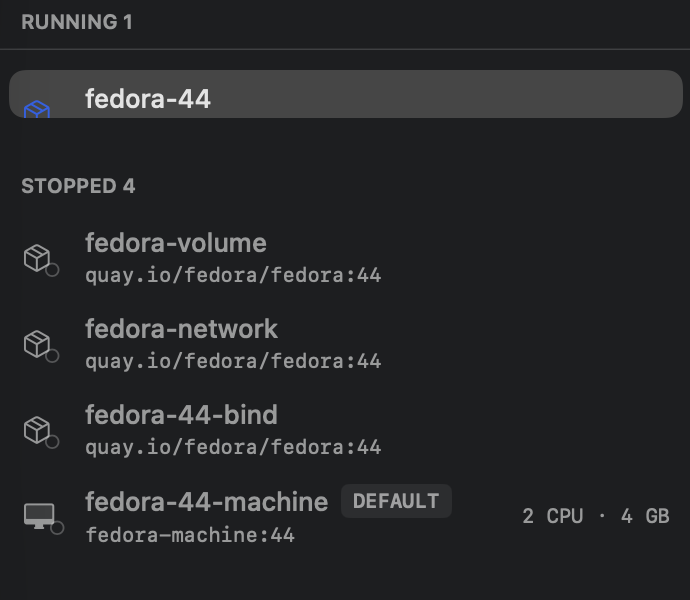
Half the height it should be. Image line gone, glyph clipped mid-badge. And it stayed that way — not a one-frame glitch, but a row permanently frozen at its awkward teenage height until you selected something else.
This is the story of finding it, fixing it wrong, and then fixing it right. The final diff is eleven lines. The interesting part is everything that made those eleven lines non-obvious.
A bug with an entry code
The report: click a stopped container, open its detail view, click Start. The container starts, but the row only shows half.
First attempts to reproduce came up empty. In mock mode — Berthly’s deterministic UI-test service — the row moved sections cleanly. Against the real daemon with a container that joined an existing RUNNING section: also clean. The bug only appears when three things line up:
- The Terminal tab is already selected in the detail view while the container is stopped (showing the “start the container to open a shell” placeholder).
- The container you start is the only thing running — so the RUNNING section itself is freshly created by the move.
- You start it from the detail view, not the row’s hover play button.
Line those up and it reproduces every single time. Miss one and the list looks perfect, which is exactly why the first three repro attempts said “works for me.”
What’s actually colliding
When the container’s status flips to .running, two unrelated pieces of UI react to the same
state change, in the same SwiftUI update:
- The list deletes the row from STOPPED and inserts it into a newly created RUNNING
section. macOS
ListisNSTableViewunderneath, so that’s a real AppKit row-insert animation, about a quarter of a second of it. - The detail view’s Terminal tab stops showing the placeholder and mounts the real
terminal (SwiftTerm wrapped in an
NSViewRepresentable). And on mount, so the shell is typable without an extra click, it does the polite thing:
DispatchQueue.main.async {
    window.makeFirstResponder(terminalView)
}
One runloop tick after mount. Which lands precisely inside the row-insert animation.
Stealing first responder isn’t visually free: the list’s selected row redraws from the focused
accent style to the unemphasized gray one. Forcing that redraw on a row that’s mid-insert, into
a section that didn’t exist a frame ago, is something the NSTableView/SwiftUI bridge turns out
to handle badly — the row’s height latches wherever the animation happened to be, and stays
latched. Later data refreshes don’t heal it, because the row’s content hasn’t changed, so
SwiftUI never re-measures it.
The proof was an experiment, not a theory: comment out the makeFirstResponder call, rebuild,
run the exact same flow. Full-height row, every time. The mount itself is harmless; the focus
grab mid-animation is the whole bug.
One subtlety worth separating: after the terminal takes focus, the selected row turning gray is correct — that’s macOS’s unemphasized selection, same as any unfocused table. The bug was only ever the height. Untangling “expected but surprising” from “broken” was half the diagnosis.
The fix that wasn’t
If the grab fires too early, delay it, right?
DispatchQueue.main.asyncAfter(deadline: .now() + 0.5) {
    window.makeFirstResponder(terminalView)
}
Half a second comfortably clears a quarter-second animation. Standalone testing: fixed, both flows, stable across refreshes. Shipped it to the working tree, wrote the confident summary.
The bug report came back within minutes: still happens, 100% reproducible.
The difference wasn’t the code — the rebuilt app demonstrably contained the fix. It was the runtime: the failing runs were launched from Xcode, debugger attached. Under the debugger the main thread commits UI work late, so the row animation can begin well after the terminal mounts — and a wall-clock timer started at mount time knows nothing about that. The 0.5s fuse was measuring the wrong thing: time since mount, when what matters is whether the animation committed alongside the mount has finished.
Timers don’t answer that question. Core Animation does.
The fix that was
Everything in this collision — the terminal mounting, the row moving — commits in the same
implicit CoreAnimation transaction. And CATransaction has exactly the hook we want: a
completion block that runs after every animation committed in that transaction has finished.
private func scheduleFocusGrab(of view: TerminalView, coordinator: Coordinator) {
    guard !coordinator.focusGrabScheduled, !coordinator.hasFocused else { return }
    coordinator.focusGrabScheduled = true
    CATransaction.setCompletionBlock { [weak view, weak coordinator] in
        guard let coordinator else { return }
        guard let view, let window = view.window else {
            // Not in a window yet — clear the latch so a later update reschedules.
            coordinator.focusGrabScheduled = false
            return
        }
        guard !coordinator.hasFocused else { return }
        coordinator.hasFocused = true
        window.makeFirstResponder(view)
    }
}
Called from makeNSView, the block joins the very transaction that’s about to commit the row
move. The grab now runs strictly after the insert animation completes — however late that
commit happens, debugger or not. No magic number to tune, nothing to measure. If the view isn’t
in a window yet when the block fires, a latch lets the next updateNSView pass reschedule.
Verified standalone and — this time — under lldb, to match the conditions the bug actually
lived in:
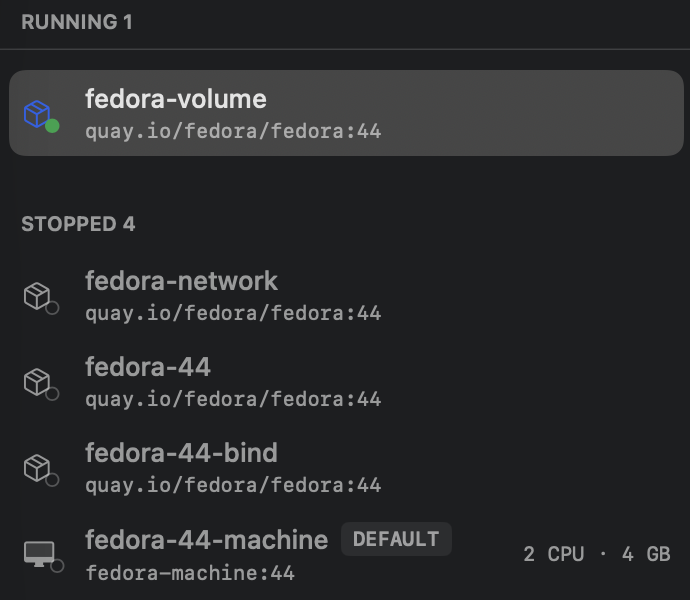
Full height, image line intact, terminal focused and typable. The row goes gray, as an unfocused selection should.
What we’re keeping
Reproduce in the reporter’s runtime, not just their steps. The timer fix passed every standalone test and failed 100% of the time under Xcode’s debugger. Same binary, same clicks — different scheduler. “Works on my machine” sometimes means “works in my process.”
Don’t poke AppKit mid-animation. makeFirstResponder, and anything else that forces a
redraw, has no business running in the same window of time as a List row move. If your
NSViewRepresentable grabs focus on mount, remember that “on mount” can coincide with any other
view reacting to the same state change.
Prefer lifecycle hooks to timers. A delay encodes a guess about how long something takes;
CATransaction.setCompletionBlock encodes the actual dependency — after these animations.
When a fix contains a duration you picked by eyeballing, that number is a bug report waiting for
a slower machine.